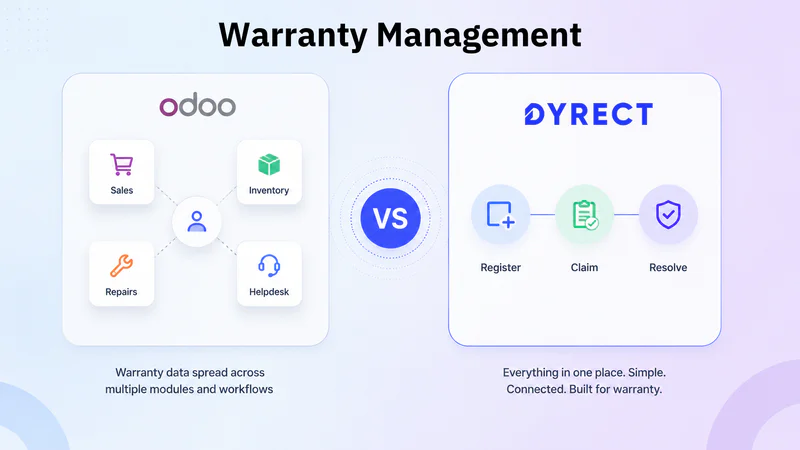
Warranty management in Odoo may sound like an easy path at first.
You already have customer records, sales orders, invoices, inventory, repairs, field service, and support tickets inside one business suite. So the natural question is: can Odoo manage warranties as well?
Well, the answer is yes, but with a catch.
Odoo can support warranty-related operations through different apps, modules, and configurations. A team can use Helpdesk for customer issues, Repairs for repair orders, Inventory for returns and serial numbers, Sales for invoices and replacement orders, Field Service for technician visits, and third-party warranty apps for more structured warranty logic.
That gives you a base for Odoo Warranty Management.
But warranty management is more than logging a service request or checking a sales order. A complete warranty journey includes product registration, warranty activation, serial validation, proof collection, customer claim forms, approval flow, repair or replacement handling, claim status updates, warranty analytics, and product ownership visibility.
This is where the comparison becomes important.
Odoo gives you business tools that can be arranged around warranty operations. Dyrect gives you a dedicated warranty management platform where registration, claims, customer visibility, automation, and after-sales service are already part of the product.
This guide compares Warranty Management in Odoo vs Dyrect across process, features, analytics, pricing, reviews, and brand fit, so you can decide which route is better for your warranty team.
What Is Warranty Management in Odoo?

Odoo is not built as a standalone warranty platform. It is a broad business suite where warranty work usually sits between sales, support, inventory, repairs, accounting, and customer service.
So when a brand uses Odoo for warranty management, it is usually trying to bring warranty data into the same environment where orders, invoices, products, customers, returns, and service records already exist.
That can make sense on paper.
If your team already uses Odoo every day, keeping warranty-related information inside the same system may look convenient. Customer details are already there. Product and sales records may already be there. Inventory and repair activity may also be there. So Odoo can become the place where warranty information is stored, checked, and connected with other business records.
But this is where the difference becomes important.
Odoo warranty management is usually not one ready-made, warranty-first experience. It depends on how your Odoo environment is configured, which apps you use, which warranty modules you install, and how cleanly everything connects.
For example, your warranty data may touch customer records, product details, serial numbers, invoices, repair orders, returns, and service tickets. Each part may live in a different Odoo app or module. That means Odoo can support warranty operations, but the experience is often assembled rather than dedicated.
For internal teams, this can be workable if the warranty process is light or if the company already has strong Odoo implementation support. But for product brands that need customer-facing registration, cleaner claim visibility, faster updates, and warranty-specific insights, the Odoo route can become more layered than expected.
Does Odoo Have a Warranty Management System?

Odoo can be used as a warranty management system, but it does not behave like dedicated warranty management software out of the box.
The warranty capability usually depends on a combination of Odoo apps and add-on modules. Native Odoo apps can support the surrounding business activity, such as customer support, inventory movement, sales records, invoices, repairs, and service tasks. Warranty-specific modules can add more focused functions like warranty periods, warranty claims, customer claim submission, expiry tracking, renewals, and product-level warranty details.
So yes, an Odoo warranty management system can be created. But it is usually created by connecting different pieces together.
That makes Odoo more flexible than focused.
For a business already running on Odoo, this can be useful. Warranty data can sit near the same records your team already uses for sales, stock, invoices, repairs, and customer communication. But the tradeoff is that the warranty experience often depends on configuration, module quality, and internal discipline.
Which Odoo Apps Are Used for Warranty Management?

Odoo warranty management usually involves several connected apps. Each app handles a different piece of the process.
Odoo Helpdesk
Helpdesk is often where the warranty issue enters the company. A customer reports a defect, service issue, product failure, damaged item, missing part, or replacement request. The support team creates or receives a ticket and starts checking the claim.
Helpdesk can support after-sales actions like returns, repairs, coupons, refunds, and field service tasks. But on its own, it is mainly a support layer. Warranty validation still needs product, purchase, serial, and policy data from other places.
Odoo Repairs
Repairs is one of the more relevant Odoo apps for warranty handling.
A repair order can include the customer, product, serial or lot number, scheduled date, responsible person, repair notes, parts, and warranty status. Odoo repair orders also support an “Under Warranty” field, which can be used when a customer should receive service at zero charge.
This is useful for repair-heavy teams, especially when spare parts and operational records need tracking.
Odoo Inventory
Inventory supports the physical movement side of warranty work. If a product needs to be returned, exchanged, repaired, or replaced, Inventory can track movements, deliveries, reverse transfers, lots, and serial numbers.
This is useful for traceability, but it is still an operational tool rather than a full customer-facing warranty platform.
Odoo Sales and Accounting
Sales and Accounting become relevant when the warranty process touches invoices, quotations, refunds, credit notes, paid repairs, or replacement billing.
For example, if a product is outside warranty, the team may create a quotation for paid repair. If the customer needs a refund, Accounting may be involved. If a replacement is issued, Sales and Inventory may both enter the process.
Odoo Field Service
Field Service can support warranty cases that require technician visits, onsite repairs, inspections, installations, or maintenance work.
This is useful for appliances, machinery, equipment, and other products that need service at the customer’s location. But again, Field Service is one part of the broader warranty flow.
Odoo Warranty Apps
Odoo Apps modules add more warranty-specific functionality. These modules may support product warranty configuration, automatic warranty expiry, customer claim forms, claim approvals, portal status, paid warranties, warranty renewals, and RMA flows.
This is where Odoo starts looking more like a warranty management system. But the result depends on the specific module, version compatibility, customization quality, and how well the module connects with the rest of the Odoo environment.
What Is Dyrect?

Dyrect is dedicated warranty management software for brands that sell physical products and need a cleaner way to manage product registration, warranty claims, customer ownership, repairs, replacements, and post-purchase visibility.
Instead of treating warranty as a side process inside a helpdesk, CRM, or ERP, Dyrect treats warranty as its own customer journey.
A customer buys a product, registers it through QR code or a branded form, receives warranty confirmation, raises a claim when needed, uploads proof or photos, tracks claim status, and receives updates. On the brand side, the team can review warranty records, validate claims, assign tickets, manage repairs or replacements, and see product-level insights.
Dyrect is built for brands that sell through Shopify, ecommerce stores, marketplaces, retail, distributors, or offline channels. That matters because many brands lose customer ownership data after the sale, especially when products are sold outside their own website.
Dyrect brings those post-purchase touchpoints into one warranty system.
It is especially useful for brands that need:
Dyrect is built for warranty teams that want the flow itself to be simpler, cleaner, and more connected.
Warranty Management in Odoo vs Dyrect: Core Difference

The clearest difference is this:
Odoo is an ERP where warranty can be configured. Dyrect is a warranty management platform where registration, claims, customer updates, and post-purchase visibility are already the core of the product.
Odoo starts from internal operations. It is designed around business records like customers, sales orders, invoices, inventory, repairs, service tickets, and accounting. Warranty can sit inside that system, but it usually has to be shaped through apps, modules, fields, rules, and workflows.
Dyrect starts from the warranty journey itself. It is designed around what happens after a product is sold: the customer registers the product, activates warranty, submits a claim, uploads proof, checks status, gets updates, and receives a repair, replacement, or resolution.
That difference matters every day.
With Odoo, the question is usually:
How do we build warranty management inside our existing business system?
With Dyrect, the question is:
How do we run warranty management better from day one?
Here is the quick snapshot:
The practical gap shows up when a customer raises a claim.
In Odoo, your team may need to check the customer record, sales order, invoice, product, serial number, repair order, return record, and claim status across different parts of the system. That can work, but only when the Odoo environment is carefully configured and maintained.
In Dyrect, the claim is connected to the warranty record from the start. Your team can see the customer, product, serial number, purchase proof, coverage status, submitted evidence, current claim stage, and resolution path in one warranty-first flow.
So this is not just a software comparison. It is an operating model difference.
Odoo treats warranty as one part of a broader business system. Dyrect treats warranty as the main journey.
For brands that only need warranty data linked to ERP operations, Odoo can be enough. But for brands that care about product registration, QR activation, customer claim tracking, repair and replacement visibility, ecommerce connection, and post-purchase customer data, Dyrect gives a cleaner path.
Odoo Warranty Management Process: How Claims Usually Flow

A warranty claim in Odoo usually moves through multiple apps. The exact process depends on your Odoo version, installed modules, and internal configuration, but most flows follow this pattern.
1. Customer reports a warranty issue
The process usually starts when a customer contacts the brand about a defective product, damaged part, malfunction, repair request, or replacement need.
This may enter Odoo through Helpdesk, email, website form, portal, phone support, or a custom warranty module.
At this stage, the record is usually a support issue. The team still needs to verify product ownership, warranty period, serial number, purchase proof, and policy coverage.
2. Agent checks customer and purchase details
Next, the agent looks for the customer record, sales order, invoice, delivery record, or ecommerce order.
This step is important because the warranty decision depends on the purchase date, product purchased, seller channel, warranty duration, and proof of purchase.
If all records sit inside Odoo, this check can be manageable. If products are sold through marketplaces, retail stores, distributors, or external ecommerce systems, the team may need integrations or manual verification.
3. Product and serial number are reviewed
For physical products, serial number validation is often critical.
Odoo Inventory can track lots and serial numbers when configured properly. The team may check whether the serial exists, whether it matches the product, whether it was sold, and whether it has already been used in another claim.
This step can reduce duplicate claims and incorrect approvals. But it relies heavily on clean product tracking and disciplined data entry.
4. Warranty eligibility is checked
The team then checks whether the product is still covered.
In a native Odoo flow, this may involve checking purchase date, invoice date, delivery date, product policy, repair order details, or a custom field. With an Odoo warranty module, the system may calculate warranty start and end dates automatically.
The claim may be marked as in warranty, out of warranty, pending review, or needing more information.
5. Repair, return, or replacement path is selected
Once eligibility is reviewed, the team chooses the service path.
If the product needs repair, Odoo Repairs can create a repair order. If a return is needed, Inventory can manage reverse transfer. If a replacement is needed, Sales and Inventory may be used to issue and deliver another unit. If a technician visit is needed, Field Service can create an onsite task.
This is where Odoo’s ERP nature appears clearly. The service path can connect with inventory, accounting, and operations, but the agent may move through several records.
6. Claim decision is communicated
Customers need updates when the claim is received, under review, approved, rejected, repaired, replaced, or closed.
In Odoo, communication may happen through Helpdesk replies, portal messages, email templates, manual updates, or custom automation.
The customer experience depends on how the flow has been configured. If the portal and messages are well built, customers can get decent visibility. If the process is more manual, customers may keep contacting support for updates.
7. Claim is closed and reported
After the repair, replacement, refund, or rejection is complete, the ticket or claim is closed.
Reporting can happen through Odoo dashboards, Helpdesk reports, Repair records, Inventory reports, or third-party warranty module reports.
Odoo can show operational data, but warranty-specific insights may require extra configuration. Teams may need to build reports for claim volume, approved claims, rejected claims, product failure trends, repair time, replacement cost, warranty cost, and support workload.
Dyrect Warranty Management Process: From Registration to Resolution

Dyrect’s warranty process starts before a claim is raised. That is the main advantage.
Instead of waiting until a customer complains, Dyrect captures product ownership at the registration stage. By the time a customer raises a claim, your team already has the customer, product, purchase, warranty, and serial details in one place.
Here is how the process usually flows.
1. Product registration and warranty activation
The journey starts when the customer registers the product.
This can happen through a QR code on packaging, a warranty card, a product insert, a manual, a website form, or an ecommerce-connected flow. For brands selling through Shopify, retail, marketplaces, dealers, or offline channels, this step is especially valuable because it brings product owners into your own customer database.
Once the customer registers, Dyrect captures key details such as customer information, product purchased, purchase date, serial number, sales channel, and proof of purchase.
The warranty is then activated and linked to that product owner.
This means your team does not have to start from zero when the customer needs support later. The product, customer, and coverage details are already connected.
2. Warranty record and customer ownership visibility
After registration, Dyrect creates a structured warranty record.
This record becomes the source of truth for that customer’s product. It shows who owns the product, which product is registered, when the warranty started, when it ends, which serial number is linked, and what coverage applies.
For the customer, this creates clarity. They know their product is registered and covered.
For the brand, this creates visibility that is often missing after the sale. You can see customers who purchased from marketplaces, offline stores, retail partners, or distributors, not just buyers from your own ecommerce store.
This is where warranty management becomes more than service handling. It becomes product ownership intelligence.
3. Claim submission with proof and product details
When a product issue appears, the customer can submit a warranty claim through Dyrect.
Instead of sending a vague email or calling support with incomplete details, the customer can submit the required information in a structured claim flow. This may include the issue description, product details, serial number, invoice, purchase proof, images, videos, and preferred resolution.
That makes the claim cleaner from the start.
Your support team receives a claim that already has context. They can see which product is involved, who owns it, whether the product was registered, what proof was uploaded, and what the customer is asking for.
This reduces back-and-forth and makes the first review faster.
4. Claim review, validation, and resolution
Once the claim is submitted, your team can review it inside Dyrect.
The team checks whether the warranty is active, whether the serial number matches, whether the proof is valid, whether the issue fits the warranty policy, and whether there are previous claims linked to the same product.
From there, the claim can move into the right outcome.
The team can approve the claim, reject it, request more information, assign it internally, initiate a repair, issue a replacement, or close the case after resolution.
This is where Dyrect’s warranty-first structure becomes useful. The claim is not treated as a random support ticket. It is connected to the customer, product, warranty record, submitted proof, and resolution path.
That gives agents a cleaner view of what needs to happen next.
5. Customer updates, analytics, and post-purchase insights
Warranty does not end when a claim is submitted. Customers want to know what is happening.
Dyrect allows customers to track claim progress and receive updates as the claim moves through review, approval, repair, replacement, rejection, or closure. This reduces repeated follow-ups and makes the experience more transparent.
For the brand, every registration and claim also becomes useful data.
Over time, Dyrect can help teams understand which products receive more claims, which issues appear often, which customers are registering products, which channels drive ownership data, which claims take longer to resolve, and where service workload is increasing.
Odoo vs Dyrect: Feature-by-Feature Comparison

By now, the difference is clear: Odoo can support warranty operations through its ERP apps and warranty modules, while Dyrect is built specifically for product registration, warranty claims, customer updates, and after-sales visibility.
Here is how both compare across the features warranty teams actually use every day.
Registration and ownership
Odoo can store customer and product data, but registration usually needs to be created through a portal, form, website flow, or warranty app. That means the experience depends on how your Odoo environment is built.
Dyrect starts with registration. Customers can scan a QR code, register the product, activate warranty, and create a direct ownership record. This is especially useful for brands selling through Shopify, marketplaces, retail, dealers, or offline channels.
Claims and validation
In Odoo, claims usually enter through Helpdesk or a warranty module. The team may then check sales orders, invoices, serial numbers, product records, repair orders, and warranty status across different areas.
Dyrect keeps the claim closer to the warranty record. The customer submits the issue, proof, serial details, and product information in one flow. The team can review coverage, validate details, and move the claim forward from a warranty-focused workspace.
Repairs, replacements, and after-sales
Odoo can handle repair orders and inventory movement well, especially for teams already using Odoo for operations. But the claim, customer communication, and resolution path may still sit across multiple apps.
Dyrect connects the claim decision with what happens next. Repair, replacement, rejection, more information, and closure stay tied to the original warranty claim. That gives support teams better context and customers clearer visibility.
Analytics and visibility
Odoo can report on tickets, repairs, stock, sales, and service activity. For warranty-specific insights, the data needs to be captured consistently across the right apps and modules.
Dyrect gives a more focused view of warranty performance. Teams can see registrations, claim trends, product issues, ownership data, unresolved tickets, and post-purchase opportunities from a warranty-first lens.
Dyrect vs Odoo: Customer Experience Comparison

Customer experience is where the difference between Odoo and a dedicated warranty management solution becomes more visible.
Odoo can support warranty-related customer interactions, but the experience depends on how the portal, forms, ticketing, emails, and modules are configured. If everything is built carefully, customers can submit requests, receive updates, and interact with support. If the flow is basic, customers may need to rely on email replies, manual follow-ups, or support tickets for claim status.
Dyrect is designed around the customer’s warranty journey. The customer can register a product, access warranty details, submit a claim, upload proof, and track progress through a more focused experience.
For customers, the main difference is clarity.
With Odoo, the warranty experience may feel different from brand to brand because each company builds the flow in its own way. One company may have a polished portal, while another may handle most claim updates through support tickets.
With Dyrect, the experience is more focused on warranty-specific actions. Registration, warranty confirmation, claim submission, proof upload, and status tracking are connected parts of the same journey.
This matters most when claim volume grows. Customers usually want three things: confirmation that their product is covered, a clear way to submit a claim, and visibility into what happens next
Pricing and Reviews
Odoo pricing usually depends on the number of users, apps, hosting choice, implementation needs, and any third-party modules required for warranty management. If your team already uses Odoo, adding warranty-related workflows may look convenient. But a complete warranty process may still need extra configuration, warranty apps, portal changes, reporting, or development support. So the real cost is usually more than the software subscription alone.
Dyrect’s pricing is more directly tied to warranty use cases. Its registration and claims plans start at $49/month, which makes the pricing easier to evaluate if your main goal is product registration, warranty records, claim intake, customer updates, and warranty visibility. Depending on the plan, brands may also need add-ons such as QR codes, serialization, advanced workflows, or higher usage limits.
Reviews show a similar difference in focus.
Odoo reviews usually talk about it as a broad business system. Users often value its range of apps and operational flexibility, but some also mention setup effort, configuration needs, learning curve, and reliance on proper implementation. For warranty management, this means the experience can vary depending on how well the system is built and maintained.
On the Shopify App Store, users mention using Dyrect for warranty registrations and claims, with positive comments around UI, support, and registration workflows. On G2, Dyrect reviews highlight ease of use, customer support, warranty management, integrations, customer engagement, and first-party data collection.
Limitations of Managing Warranties in Odoo

Odoo can support warranty operations, but it has clear limitations when a brand needs a dedicated, customer-facing warranty system. The challenge is usually not whether Odoo can store warranty-related data. The challenge is how much effort it takes to make the warranty experience smooth, trackable, and useful for both customers and internal teams.
1. Warranty is spread across multiple apps
Odoo warranty management usually depends on several apps working together. Helpdesk may handle the customer issue. Sales may hold the invoice. Inventory may hold serial numbers and returns. Repairs may handle repair orders. Accounting may handle refunds or charges. A warranty module may handle coverage rules.
That spread can create friction. Agents may need to move between records before they can make a claim decision. If data is missing or stored differently across teams, warranty handling becomes slower and more manual.
2. Customer-facing warranty flows need extra work
Product registration, claim forms, warranty cards, claim tracking, proof uploads, and customer updates are not usually delivered as one clean warranty journey in Odoo. They often need portal configuration, website forms, third-party modules, or custom development.
For brands that want customers to scan a QR code, register a product, submit a claim, upload proof, and track status, this can become a heavier build than expected.
3. Warranty-specific automation depends on configuration
Odoo can automate workflows, but warranty-specific automation has to be planned and configured. Approval rules, eligibility checks, claim status updates, repair routing, replacement triggers, and customer notifications may require custom fields, modules, or automation logic.
This makes the final experience highly dependent on implementation quality. Two companies using Odoo can have completely different warranty workflows.
4. Reporting may not be warranty-first
Odoo can report on tickets, sales, repairs, inventory, and accounting activity. But warranty teams usually need focused visibility into claim reasons, product failure trends, registration rates, warranty cost, approval rates, repeat claims, and resolution time.
Those insights may require clean data capture across multiple apps. If the claim journey is scattered, reporting becomes harder to trust.
5. It can become complex as claim volume grows
Odoo may work well when claim volume is low or the process is mostly internal. But as registrations, claims, repairs, replacements, and customer follow-ups increase, the workflow can become difficult to manage across apps and modules.
Final Verdict: Should You Manage Warranty Workflows in Odoo or Dyrect?
Manage warranty workflows in Odoo if your warranty process is mainly tied to internal operations.
Odoo can make sense when your team already uses it for sales, inventory, repairs, accounting, and field service. If your warranty needs are mostly about checking invoices, tracking returned products, creating repair orders, managing stock movement, or billing for out-of-warranty service, Odoo can support that through its existing apps and modules.
But Odoo becomes heavier when the warranty is customer-facing.
If you need product registration, QR activation, digital warranty records, claim forms, proof uploads, customer claim tracking, automated updates, repair or replacement visibility, and warranty-specific insights, Odoo usually needs extra configuration, third-party apps, or custom development.
Choose Dyrect if warranty is a core part of your customer experience.
Dyrect is the better fit for brands that want a dedicated warranty workflow from registration to claim resolution. Customers can register products, submit claims, upload proof, track status, and receive updates. Your team can validate warranty records, review claims, manage approvals, handle repairs or replacements, and monitor warranty data in one focused system.
For product brands selling through Shopify, ecommerce, retail, marketplaces, dealers, or offline channels, Dyrect is the stronger choice. It gives warranty teams the structure they need without forcing them to stitch the process across multiple ERP modules.