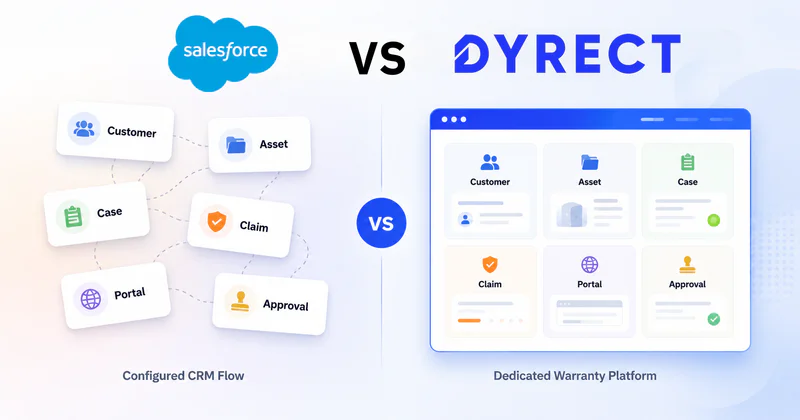
Warranty management in Salesforce sounds clean on paper. You already use Salesforce, customer data sits there, service teams can create cases, and with enough configuration, warranty flows can be built around assets, claims, entitlements, approvals, and service records.
But here’s the real question: is Salesforce the right place to run a complete warranty experience for your customers, or are you better off with a dedicated warranty management platform built for registrations, claims, automation, product ownership, and post-purchase engagement?
That question becomes even more important when warranty is tied to real customer-facing moments. A buyer scans a QR code. A customer registers a product. Someone uploads an invoice for a claim. Your support team checks eligibility. A replacement request gets approved. A brand collects product ownership data from Shopify, retail, marketplaces, and offline sales. Warranty management is far bigger than storing a warranty record inside a CRM.
Salesforce can be configured for warranty workflows, especially for enterprise manufacturing environments. But for teams that care about smoother warranty registration, cleaner claim handling, better customer experience, faster automation, ecommerce connections, and post-purchase visibility, a dedicated warranty management solution like Dyrect deserves serious attention.
This comparison breaks down how warranty management in Salesforce actually functions, what it covers, where it gets complicated, and how Dyrect approaches the same problem from a warranty-first perspective.
By the end, you’ll have complete clarity on whether your team should manage warranties inside Salesforce, or choose a dedicated platform like Dyrect for a more focused, end-to-end warranty experience.
What Is Warranty Management in Salesforce?

After the purchase, warranty becomes one of the highest-friction customer moments. A customer wants to register a product, check coverage, submit a claim, upload proof, track status, get approval, request repair, or receive a replacement. Your team wants the same thing from the business side: clear product data, valid warranty terms, claim history, service records, approval rules, and visibility into what is happening.
Salesforce can handle parts of this through its CRM, service, manufacturing, asset, and automation tools. In a Salesforce warranty management flow, warranty data usually connects with customer records, products, assets, cases, entitlements, service teams, partners, and claim approvals.
That means a warranty process in Salesforce may include things like:
creating warranty terms for products
connecting warranties with customer or asset records
allowing customers, dealers, or partners to submit claims
checking whether a claim is covered
routing claims for review or approval
tracking reimbursement, repair, or replacement details
viewing claim status, asset history, and service activity
So the idea is less about a standalone warranty app and more about building warranty operations inside the Salesforce ecosystem.
That distinction is important. Salesforce can store and process warranty information, but the experience depends heavily on how the system is configured, which Salesforce products are involved, and how much implementation effort your team is ready for.
For a company already deep inside Salesforce, this can create a connected service workflow. But for a brand that wants warranty registration, QR activation, claim tracking, customer updates, ecommerce sync, and product ownership data to run smoothly from day one, the Salesforce route can start to feel heavier than expected.
Which Salesforce Products Are Used for Warranty Management?

Salesforce warranty management usually involves a mix of Salesforce products rather than a single lightweight tool. The exact stack depends on the company’s size, industry, service model, and existing Salesforce environment.
The main Salesforce product tied to warranty is Manufacturing Cloud, now also discussed under Salesforce’s newer manufacturing and Agentforce positioning. This is where Salesforce’s Warranty Lifecycle Management capabilities sit. It covers warranty terms, warranty programs, claim collection, claim review, adjudication, partner workflows, and payout visibility.
But Manufacturing Cloud is usually part of a broader Salesforce stack. Warranty workflows often touch several connected products.
1. Manufacturing Cloud
Manufacturing Cloud is the primary place where Salesforce supports warranty lifecycle management. It is built for manufacturers managing products, assets, partners, service operations, and claims.
This is where teams can define warranty programs, set warranty terms, manage covered parts, apply usage limits, review claims, and track warranty-related activity. It is especially relevant for companies with dealer networks, distributors, service partners, complex products, and reimbursement-based claim handling.
2. Service Cloud
Service Cloud handles the customer support side. If a customer contacts the company about a defective product, failed part, repair request, or warranty claim, Service Cloud can manage the case and agent workflow.
In a warranty process, Service Cloud can connect customer conversations with cases, warranty records, service history, and next steps. It can also support agent dashboards, routing, escalation, and customer communication.
3. Field Service
Field Service becomes relevant when warranty claims involve technicians, service visits, repairs, installations, inspections, or work orders.
For example, if a warranty claim requires a technician to inspect an appliance or repair equipment at a customer location, Field Service can manage appointments, technician schedules, work orders, parts, and service completion.
4. Experience Cloud
Experience Cloud is used when companies want a portal for customers, dealers, distributors, or service partners.
For warranty management, this can allow users to submit claims, view claim status, upload documents, access product details, and interact with service teams. This is useful for partner-heavy warranty operations, but it usually requires portal planning and configuration.
5. Flow Builder and Business Rules Engine
Salesforce automation tools are used to move claims through review and approval paths.
Flow Builder can automate actions such as updating claim status, assigning tasks, routing claims, sending alerts, or creating related records. Business Rules Engine can apply claim approval logic based on coverage rules, claim value, product type, warranty terms, usage limits, and related conditions.
6. MuleSoft and APIs
For companies with ERP, ecommerce, dealer systems, service tools, or custom databases, MuleSoft and Salesforce APIs can connect warranty data across systems.
This matters when claim data, product serials, invoices, repair orders, replacement orders, or customer records sit outside Salesforce.
In short, Salesforce warranty management often requires a combination like this:
Manufacturing Cloud for warranty logic, Service Cloud for support, Field Service for repair operations, Experience Cloud for portals, and Flow Builder for automation.
That stack can be powerful, but it also explains why Salesforce warranty management often suits larger manufacturing teams with dedicated admin, implementation, and system resources.
What Is Dyrect?

Dyrect is a dedicated warranty management platform built for brands that want warranty registration, claims, customer visibility, and post-purchase automation outside a heavy CRM stack.
For teams comparing warranty management in Salesforce with a purpose-built platform, Dyrect is the most seamless option out there:
Customer buys a product → registers warranty → gets a digital warranty card → raises a claim → tracks status → receives updates → brand manages everything from one warranty dashboard.
Dyrect is built around that full flow. Here’s how it fits in your warranty journey:
Before Dyrect, warranty data often gets scattered across:
Shopify/ marketplace orders
support tickets
spreadsheets
email threads
manual claim forms
dealer or retail purchase records
customer service notes
disconnected product serials
With Dyrect, those warranty touchpoints move into one dedicated system:
who bought the product
which product they own
which serial number is linked
when the warranty started
what coverage applies
whether a claim is valid
what the current claim status is
which customer needs an update
which products are creating more claims
For a brand selling through Shopify, marketplaces, retail, distributors, or offline channels, this is where Dyrect becomes super beneficial. It captures product ownership data after purchase, even when the brand did obtain full buyer details at checkout.
Dyrect vs Warranty Management in Salesforce: Core Difference

The core difference is this:
Salesforce is a CRM platform where warranty management can be configured. Dyrect is a warranty management platform where registration, claims, customer communication, and product ownership are already the center of the product.
Salesforce starts from the company’s internal system: accounts, contacts, assets, cases, entitlements, service teams, partners, approvals, and reporting. Warranty becomes one part of a larger Salesforce environment. For large manufacturers already running Salesforce, that can make sense. Warranty data can sit alongside sales, service, field operations, dealer records, and customer history.
Dyrect starts from the warranty journey itself: product registration, QR activation, digital warranty cards, claim submission, claim review, customer updates, repair, replacement, and post-purchase engagement. The platform is built for the moments customers and support teams deal with every day after a product is sold.
Here is the clearest way to see the gap:
The biggest practical difference appears when a customer actually uses the warranty experience.
In Salesforce, the brand usually has to design how registration will happen, how claim forms will collect data, which portal customers will use, how records will connect, how approval rules will run, and how updates will reach the customer. Salesforce gives the infrastructure, but the warranty experience often depends on implementation quality.
In Dyrect, those warranty flows are already the product. Customers can register products, submit claims, track status, and receive updates. Internal teams can review claims, validate purchase details, check serial numbers, manage approvals, and view ownership data from one place.
Another major difference is the type of brand each platform serves best.
Salesforce fits companies with complex manufacturing operations, partner networks, dealer claims, service teams, and reimbursement workflows. It is stronger when warranty is tied to a larger enterprise operation.
Dyrect fits brands that need warranty to move faster across Shopify, ecommerce, retail, offline, and marketplace sales. It is stronger when the goal is customer registration, claim automation, product-level visibility, buyer data capture, and better post-purchase experience.
Salesforce Warranty Management Process

Salesforce warranty management usually runs through a connected stack rather than one dedicated warranty tool. The process can be powerful, but each part needs the right Salesforce product behind it.
Here is how the flow usually breaks down.
1. Set up warranty programs and coverage rules
The warranty process starts with defining what is covered, for how long, under which terms, and for which products or assets.
Use Manufacturing Cloud / Warranty Lifecycle Management for this.
This is where teams can create warranty terms, coverage rules, usage limits, covered parts, labor coverage, expense coverage, exclusions, and eligibility logic.
For example, a manufacturer may define:
2-year warranty on a product line
limited coverage for specific parts
labor reimbursement for approved service partners
usage-based limits
claim exclusions for certain failure types
This layer decides whether a claim can move forward.
2. Connect products, customers, and assets
After warranty terms exist, Salesforce needs to know which customer owns which product, asset, or equipment.
Use Manufacturing Cloud, Service Cloud, or Field Service depending on the business model.
For asset-heavy companies, Salesforce can connect warranties to assets. For service teams, customer cases can connect with warranty records. For field teams, work orders can connect repairs with the covered asset.
This is where Salesforce is strongest for enterprise operations. Customer, product, asset, case, and service history can all sit inside the same ecosystem.
3. Create the warranty registration flow
Warranty registration in Salesforce usually needs a configured customer or partner-facing experience.
Use Experience Cloud, Salesforce forms, custom apps, APIs, or mobile apps for this.
A customer, dealer, or service partner may submit product details, purchase proof, serial number, invoice, installation date, or asset information. Then Salesforce can create or update the asset and attach warranty coverage.
This part often needs more planning, since the registration experience depends on how the company wants customers or partners to submit information.
4. Capture warranty claims
Once a product has an active warranty, claims need a place to enter the system.
Use Warranty Lifecycle Management for claim records, Service Cloud for case support, and Experience Cloud or APIs for claim submission.
A claim can include:
customer details
product or asset details
serial number
issue description
defect code
proof of purchase
photos or documents
labor, parts, and expense details
repair or replacement request
Salesforce can create claim records and connect them with assets, products, accounts, cases, partners, and warranty terms.
5. Review claim eligibility
After a claim enters Salesforce, the team needs to check whether it qualifies.
Use Warranty Lifecycle Management, Business Rules Engine, and Flow Builder here.
Eligibility checks can look at:
warranty start date
warranty duration
product coverage
usage limit
part coverage
claim type
service history
exclusion rules
previous claims
For smaller claim volumes, teams may review claims manually. For larger operations, Salesforce rules and flows can route claims, flag exceptions, or approve claims based on predefined logic.
6. Adjudicate and approve claims
Claim adjudication is where Salesforce decides what happens next.
Use Warranty Lifecycle Management for adjudication and Flow Builder for routing.
The team can approve, reject, adjust, escalate, or send the claim for more review. In partner or dealer warranty programs, this may also include reimbursement amounts, payout details, labor charges, part costs, and adjusted claim amounts.
This is one of Salesforce’s stronger areas for manufacturing warranty programs, especially when claims involve service partners and reimbursement workflows.
7. Manage repair, replacement, or service work
If the claim requires physical service, replacement, inspection, or technician activity, Salesforce needs operational tools beyond claim approval.
Use Field Service for technician visits, work orders, service appointments, and repair activity. Use Service Cloud for customer support cases.
A repair workflow may include:
creating a work order
assigning a technician
scheduling a service appointment
tracking parts used
updating repair status
closing the case after service completion
For replacement workflows, Salesforce may need to connect with order management, inventory, ERP, or ecommerce systems.
8. Communicate claim status
Customers, partners, and internal teams need status updates as the claim moves forward.
Use Service Cloud, Experience Cloud, email/SMS integrations, and automation flows for this.
Salesforce can notify users when a claim is submitted, reviewed, approved, rejected, escalated, or closed. If a portal is configured, customers or partners can log in to view claim progress.
This communication layer depends heavily on the implementation. Salesforce can support it, but the experience has to be designed.
9. Track analytics, payouts, and warranty performance
Once claims are flowing, teams need visibility into warranty cost, claim volume, approval rates, failure trends, service activity, and payout behavior.
Use Salesforce reports, dashboards, Manufacturing Cloud analytics, and claims analysis dashboards.
Warranty teams can track:
claim volume
claim status
approved vs rejected claims
payout amounts
product failure patterns
service partner performance
defect codes
warranty profitability
asset history
case volume linked to warranty issues
Salesforce can provide strong visibility when all relevant warranty, service, asset, and financial data is connected properly.
Dyrect Warranty Management Process

Dyrect’s warranty process is more direct because registration, claims, customer updates, and warranty records sit inside the same workflow.
1. Add products and warranty rules
Brands start by adding products, warranty duration, coverage details, registration fields, required documents, and claim rules.
Use this for:
product-wise warranty policies
serial-number tracking
purchase proof requirements
claim eligibility checks
repair or replacement conditions
Once the rules are added, every registration and claim can be checked against the right product and warranty policy.
2. Capture warranty registrations
Customers can register products through QR codes, branded forms, embedded forms, or ecommerce-triggered flows.
Use this for:
Shopify order-based registration
retail or offline purchase registration
marketplace buyer registration
serial-number capture
invoice or purchase proof upload
customer contact details
Each registration creates a warranty record linked to the customer, product, serial number, purchase date, and coverage period.
3. Send warranty confirmation
After registration, customers can receive warranty details through a digital warranty card or confirmation message.
Use this for:
warranty activation confirmation
coverage start and end date
product ownership proof
future claim reference
customer self-service access
This reduces confusion later when customers need to check whether a product is still covered.
4. Collect claims from customers
When a customer raises a claim, Dyrect captures the details your team needs to review it.
Claim forms can collect:
product details
serial number
issue description
photos or videos
invoice or purchase proof
preferred resolution
customer contact information
Each claim becomes a trackable ticket, so support teams do not have to manage warranty requests across emails, sheets, and scattered tools.
5. Review and validate claims
Teams can review the claim against warranty records, product data, serial numbers, purchase proof, and submitted evidence.
Use this stage to:
confirm warranty eligibility
check duplicate claims
validate serial numbers
request more information
mark claims as approved or rejected
assign claims to team members
This gives agents a cleaner view of what happened, what is covered, and what action needs to happen next.
6. Manage repair, replacement, or rejection
Once the claim is reviewed, teams can move it into the right resolution path.
Common actions include:
approve claim
reject claim
request more details
initiate repair
issue replacement
create a follow-up task
update claim status
For Shopify users, higher plans can support repair and replacement workflows, automatic Shopify order creation, billing, invoices, estimates, and service visibility in the customer portal.
7. Keep customers updated
Customers can track claim progress through the portal, while teams send status updates through connected communication flows.
Use this for:
claim received
under review
approved
rejected
repair in progress
replacement issued
claim closed
This reduces manual follow-ups and gives customers clearer visibility.
8. Track warranty insights
Teams can monitor registrations, claims, ticket activity, product issues, customer data, and agent performance.
Use these insights to find:
products with frequent claims
claim volume by product
registration trends
unresolved tickets
support workload
warranty claim patterns
post-purchase engagement opportunities
The result is a cleaner warranty operation where registrations, claims, products, customers, and service outcomes stay connected.
Managing Warranties in Salesforce vs Dyrect: Feature-by-Feature Comparison

By this point, the difference should be clear: Salesforce can support warranty management through a larger CRM and manufacturing stack, while Dyrect gives brands a dedicated warranty layer for registration, claims, customer visibility, and post-purchase automation.
Here’s how both compare across the features that actually matter when a warranty program is running every day.
Registration: CRM record vs customer-owned warranty flow
Salesforce can store warranty registration data, but the registration path usually has to be designed. Teams may need to connect customer records, product records, assets, portals, forms, and automation before the flow becomes usable for customers.
Dyrect treats registration as a core product action. Customers can scan a QR code, submit product details, upload proof, and receive warranty confirmation. For brands selling through Shopify, retail, marketplaces, or offline channels, this is especially valuable because registration becomes a way to capture product ownership data after purchase.
Claims: enterprise adjudication vs warranty-first ticketing
Salesforce is strong when claims involve complex manufacturing rules, partner submissions, labor charges, expense coverage, service codes, and reimbursement logic. The claim process can be detailed, but it often depends on multiple Salesforce products and configuration.
Dyrect handles claims from a more direct brand-and-customer angle. Customers submit claims, agents review warranty records, serial numbers, proof of purchase, images, and issue details, then move the claim toward approval, rejection, repair, or replacement.
Customer experience: configured portal vs built-in warranty visibility
Salesforce can support customer and partner portals through Experience Cloud. For companies with dealer networks or complex service operations, that can be useful. But the portal experience still has to be planned, designed, connected, and maintained.
Dyrect gives customers a clearer warranty path: register product, access warranty details, submit claim, track claim status, and receive updates. For a customer, warranty becomes a guided journey rather than a service ticket hidden inside a CRM process.
Automation: broad Salesforce tools vs warranty-specific workflows
Salesforce automation is powerful. Flow Builder and Business Rules Engine can route claims, apply rules, assign tasks, and trigger approvals. But those flows need to be built around the company’s warranty logic.
Dyrect’s automation is focused around warranty tasks: registration confirmation, claim intake, proof collection, team assignment, claim status updates, repair/replacement steps, and customer communication.
Analytics: enterprise reporting vs warranty visibility
Salesforce can offer deep reporting when warranty data is connected with assets, cases, orders, service teams, partners, and financial systems. For enterprise manufacturers, this can support warranty profitability, payout tracking, defect patterns, and service performance.
Dyrect’s visibility is more focused on what warranty and post-purchase teams need every day: registrations, claim volume, product-level issues, customer ownership, ticket status, agent activity, and post-purchase engagement opportunities.
Dyrect vs Salesforce: Customer Experience Comparison

Warranty management gets judged by customers during high-friction moments. They bought the product, something went wrong, and now they want a clear path: register the product, check coverage, submit proof, raise a claim, track status, and get an update.
With Salesforce warranty management, the customer experience depends on how well the company builds the front-end flow. Salesforce can support portals, forms, service cases, claim records, and status updates, but the experience usually needs to be configured across tools like Experience Cloud, Service Cloud, Manufacturing Cloud, automation, and integrations.
For the customer, that can mean the experience varies a lot from brand to brand. One Salesforce implementation may give a clean claim portal. Another may send customers through support tickets, email threads, case updates, or partner forms before the claim moves forward.
Dyrect, on the other hand, is closer to what customers expect from a modern warranty journey. The customer can scan a QR code, register the product, get a digital warranty card, submit a claim, upload proof, and track progress through a self-service experience.
That difference matters because customers rarely care which backend system a brand uses. They care about whether the warranty process is clear.
Where the experience differs
The biggest customer-side advantage of Dyrect is clarity. Warranty actions are visible, direct, and tied to the product the customer owns.
Salesforce can support a strong experience when implemented well, especially for enterprise service teams. But for brands that want customers to move through registration, claim submission, and claim tracking with less friction, Dyrect gives a more focused warranty journey from the start.
Pricing and Reviews
Pricing is one of the clearest differences between Salesforce and Dyrect.
Salesforce warranty management is usually part of a larger Salesforce stack. The cost can include Manufacturing Cloud, Service Cloud, Field Service, Experience Cloud, automation, integrations, implementation, admin support, and ongoing customization. Salesforce manufacturing plans are generally enterprise-priced and billed per user annually, with public pricing starting in the hundreds of dollars per user per month.
So the real cost is rarely the license alone. Teams also need to consider configuration, consultants, internal Salesforce admins, portal development, ecommerce connections, reporting, and maintenance.
Dyrect is more direct for warranty teams. Its main platform pricing is sales-led, but the Shopify App Store gives a useful public pricing signal. Dyrect’s Claims plan starts at $49/month, covering claims management, customer portal claim tracking, customer communication, and fraud claim prevention. Its Claims Pro plan is listed at $149/month, adding repair and replacement workflows, automatic Shopify order creation, billing, invoices, estimates, and service visibility in the customer portal.
For brands that want warranty registration and claims management without building a large CRM workflow, Dyrect is easier to evaluate from a cost and adoption angle. Reviews also tell a clear story.
Dyrect has direct warranty-specific review proof. On the Shopify App Store, Dyrect Warranty Registration & Claims is rated 5 stars, with users mentioning warranty registration, claim handling, cleaner dashboards, automated email updates, and time savings.
On G2, Dyrect reviews highlight ease of use, customer support, warranty management, integrations, customer-data capture, and a smoother way to manage registrations and claims. Some users also mention wanting deeper analytics, which is useful to know.
Salesforce has strong general CRM and service reviews, but public reviews specifically about Salesforce Warranty Lifecycle Management are harder to find.
Limitations of Warranty Management in Salesforce
Salesforce can support warranty management, but the main limitation is that warranty is handled as part of a larger CRM and manufacturing system. For many brands, that means more planning, more configuration, and more moving parts before the warranty experience becomes smooth for customers and teams.
1. It usually needs multiple Salesforce products
Warranty management in Salesforce often involves Manufacturing Cloud, Service Cloud, Experience Cloud, Field Service, Flow Builder, Business Rules Engine, APIs, and sometimes MuleSoft.
Each product handles a different part of the process:
Manufacturing Cloud for warranty programs and claims
Service Cloud for cases and support
Experience Cloud for customer or partner portals
Field Service for repairs and technician workflows
Flow Builder for automation
APIs or MuleSoft for external systems
The result can be powerful, but it also means the warranty flow depends on a larger Salesforce stack.
2. Customer-facing warranty flows need configuration
Customers expect a clean flow: register product, upload proof, submit claim, check status, and receive updates.
In Salesforce, that experience usually has to be built through portals, forms, automation, and connected objects. If the front-end flow is poorly designed, customers may end up moving through cases, emails, partner forms, or manual support steps.
This becomes a major issue for brands where warranty is a direct customer experience, not only an internal service process.
3. Ecommerce and QR-based registration are not native warranty strengths
Brands selling through Shopify, marketplaces, retail stores, distributors, or offline channels need to capture product ownership after purchase.
Salesforce can be connected to ecommerce systems, but warranty registration through QR codes, digital warranty cards, Shopify-triggered registration, and customer self-service flows usually require extra setup or third-party tools.
For D2C and consumer-product brands, that adds friction.
4. Implementation can get expensive and slow
Salesforce pricing is generally user-based and enterprise-oriented. Beyond licenses, companies may need consultants, admins, developers, portal configuration, integration work, custom reporting, and ongoing maintenance.
Warranty teams that mainly need registration, claim tracking, proof uploads, approvals, and customer updates may find the Salesforce route heavier than required.
5. Warranty usability depends on implementation quality
Salesforce is flexible, but flexibility cuts both ways. A strong team can build a detailed warranty operation. A rushed or under-planned implementation can create confusing screens, scattered records, slow claim review, and poor customer visibility.
The platform gives the building blocks. The warranty experience still has to be assembled.
Overall, Salesforce can manage warranty workflows, but it often requires a larger system, deeper configuration, and more operational effort than a warranty-first platform like Dyrect.
Final Verdict: Should You Manage Warranty Workflows in Salesforce or Dyrect?
Choose Salesforce if your warranty process is deeply tied to enterprise manufacturing operations.
Salesforce makes more sense when your team already runs Salesforce, manages complex assets, handles dealer or partner claims, needs reimbursement workflows, uses field service teams, and has Salesforce admins or consultants avaZOHOilable. It can support warranty programs, claims, approvals, service records, partner portals, and reporting, but it usually needs a larger stack and proper configuration.
Choose Dyrect if you want a dedicated warranty management platform that is easier for customers and cleaner for internal teams.
Dyrect is the better fit when your brand needs:
warranty registration
QR-based product activation
digital warranty cards
claims management
proof uploads
customer claim tracking
ecommerce connections
repair and replacement workflows
product ownership data
post-purchase automation
The core difference is speed and focus. Salesforce gives you a broad system where warranty can be built. Dyrect gives you warranty workflows that are already built around registrations, claims, customers, products, and post-purchase visibility.
For large manufacturers already invested in Salesforce, managing warranties inside Salesforce can make sense.
For D2C, ecommerce, retail, marketplace, and consumer-product brands, Dyrect is the stronger choice. It keeps warranty management focused, customer-friendly, and easier to run across registration, claims, communication, and product ownership.